Translate this

Showing posts with label Wireless. Show all posts

Thursday, September 13, 2012

iPhone 5–Flattering to disappoint


The newest version of the most important product from Apple was unveiled yesterday. With purists gunning for bleeding edge tech to be adopted and inserted into ever thinning profile were not disappointed, it was still a lackluster debut where I felt certain key things were missed.

Build

It was a welcome return to the original design, which was one of the greatest reasons, iPhone sold out when it was introduced. The aluminum back would greatly reduce the need to invest in a phone case.

Physical dimension – Apple avoided the lure of going big and stuck to something which I really appreciated - The width is being retained while the length was increased. I have rotating use of the HTC One X, iPhone 4, and Blackberry 9700. I believe the fit in your pal determines, what you tend to pickup for your daily use irrespective of screen size and features.

I personally do not bother with the 4.0 inch screen introduced. 4.3 would have been the best screen to introduce and continue for a few years, after all, our palms will not evolve in next few years for us to feel the Galaxy Note screens to be any smaller.

Hardware Upgrades

The other hardware upgrades were either expected, given the current crop of smartphones with overflowing features. But, Apple still is left behind by missing to introduce several features beyond the obvious. Retina displays are common, so is LTE and high end optics in flagship phones. Neither did Apple introduce newer Bluetooth version.  The change of data port pin is a bit relief, but again, Micro USB plugs have been around for a while, and we are now heading into Era of Wireless charging, so Apple seem to be chasing the past here.

IOS 6 – Although announced during early Summer, it would turn out to be the weakest part of iPhone eco system, which lacks innovation. It should have been a innovative upgrade, but has ended up being incremental. The classic look is now getting stale and unless, Apple introduces dynamic icons / screen elements to catch up with Android widgets or Live tiles of Metro UI. Apple might excel at what it does, but then so did Blackberry with mobile email. It did not take much time for Blackberry to start staring at its grave with the onslaught of consumer preferences, which they ignored.

What’s for future – The wishlist for iPhone 6 is already out on some tech blogs, I thought I would put in one from my side as well.

  • 4.3 inch screen,
  • Dynamic screen elements,
  • World phone with world wide LTE capabilities in single device,
  • NFC or similar approach to use with passbook,
  • Offline navigation as standard,
  • FM Radio (It’s a unicorn in Apple world),
  • Wireless Charging,
  • USB Mass Storage mode,
  • and a decent set of Earphones, which you don’t throw away after 2 months.

Monday, February 28, 2011

Your route to the wireless world - Wireless Routers

As Internet transcends to our everyday activities, the desire to access the information and store data without being constrained to connected cables is more pronounced than ever. Although, city wide WANs are still in the nascent stages of implementation, the mushrooming of small wireless networks in the homes and in enclosed public areas such as malls and restaurants/stores has been anything but slow. You can find Wifi probably more easily than public telephones nowadays in the cities of US.

This post addresses picking up the better equipment for making your life wire-less inside your home. I shall address the nuances of public place Wifi hotspots in a later post.

I have been battling a war against the 2.4Ghz and 5Ghz in my home. The reason, is the "mushroom" of Wifi equipment in residential apartments as everyone goes Wireless in their homes and couple it with the multitude of gadgets which use the same 2.4 Ghz as do the wireless routers. This congestion of the frequency spectrum causes couple of issues which are highlighted below :

1. Interference due to concurrent use of devices such as cordless telephones or Microwave equipment.
2. Interference due to large number of wireless equipment in a given area.
3. Cross-Interference between equipment when the frequency are right next to each other.

The above issues coupled with other technical difficulties led to induction of the 5Ghz frequency in wireless equipment. This not only ensured that the wireless equipment operated in a range where none of the household equipment currently operate, but also to give a steady signal strength as well.

This introduction of a separate frequency led to design of new wireless equipment which utilize either 2.4 or 5 Ghz transmissions, or come with dual band frequency transmitters to support legacy equipments. Now, you might be thinking, what does all the above mean to an average consumer who just wants to buy a wireless router. Here's why.

If you know your equipment which utilize Wi-Fi functionality such as phones, laptops, tablets, PMPs. You can zero-in on the frequency you would require while also taking into consideration how much congested your wireless space is.

Wifi-n is the current standard which supports both 2.4 and 5Ghz bands depending on the manufacturer of the equipment. Older equipment running on Wifi-g / b operates mostly on 2.4Ghz while Wifi-a operates at 900 Mhz.
 
2.4 GHz is probably the most congested of all. Anything which emits radio signal probably uses it. So, if you are looking at getting a new telephone or router, here is what you can do to save yourself interference headaches and performance issues :
 

Computing / Networking Equipment

Wireless Router Telephone
Older Computing Equipment with Wi-fi G capability Wireless - G DECT 6.0
New computing Equipment with Wi-fi N capability Wireless – N DECT 6.0
Mix of the above Dual & Simultaneous band Wireless – G/N DECT 6.0

Most of the home networking setup would land in the last category where you would encounter mix of old and new equipment. The best way to address this go for the dual band and importantly “simultaneous” transmitting wireless router. Here is the marketing gimmick you need to be aware of :

a. Almost all of today’s Wireless routers come with flexibility to allow Wi-Fi N access over 2.4 and 5 GHz bands, but within the configuration, only one can be active at a given time.

b. The ones which come with capabilities to operate on both the bands are not very clearly identified unless you can find the word “simultaneous”.

The latter is always on a higher range price , but it will serve you well in many ways. First, the older equipment can keep chugging at the 2.4 spectrum, whereas all the new equipment supporting Wi-Fi N would benefit from accessing the 5GHz spectrum. It will allow the newer equipment to work at its best setting thus provide your with a faster bandwidth experience in operation. The networking mantra is always “the least speed of a connected device will determine the overall speed for the network”, this is also true for wired and wireless connections.

If you go with the last category in the table, your network should be operating in the following way :

  1. Wi-Fi N clients >>> 5 GHz  >>>65 – 300 Mbps connectivity
  2. Wi-Fi G clients >>> 2.4Ghz >>>36-54 Mbps connectivity.

Couple of noteworthy Wireless routers are shown below, which I have tried out :

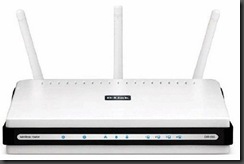
Wireless G/N Device ( Operates on one band at a time).

Dlink DIR-655

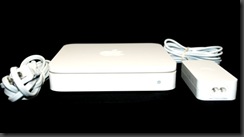
Wireless G/N Device (Operates simultaneous bands)

Apple Airport Extreme

Netgear N600 Wireless Dual Band Gigabit Router WNDR3700

I hope the above points help you in deciding the right equipment and provide the value of investment with peace of mind. Happy Networking.

Popular Posts